
Even Though there are many websites which explains about how to add floating facebook like box, twitter share box and google + box in blogger, I feel there was no clarity in any posts and also many failure rate was there.
I’m not only posting this to share with friends but also to remind myself how I did it.
How to add floating Facebook like box
- Go to Blogger Dashboard
- Go to Template –> Edit HTML
- Copy and paste this following text
You can put the code above right before the </body> tag of Blogger XHTML.
The position of the floating sharer will be relative to your blog size. So, you have to doodle with the top and left amount of pixels. If you want to put it on the right, you can change the word leftto right on the CSS codes (the codes inside the <style> and </style>).
You also can tinker and probably add another CSS styling to enhance the share buttons wrapper.
Even After using this code if facebook like box is not visible then it must be because of APP ID.
you should remove the facebook script from the above code. (<div id=”fb-root”>……)
Even after removing it if your blog doesn’t show facebook like box then it must be because there should be JavaScript SDK.
To add that
https://developers.facebook.com/docs/plugins/share-button
and type your website address in URL to share box and then select “Get Code”
To add that
https://developers.facebook.com/docs/plugins/share-button
and type your website address in URL to share box and then select “Get Code”
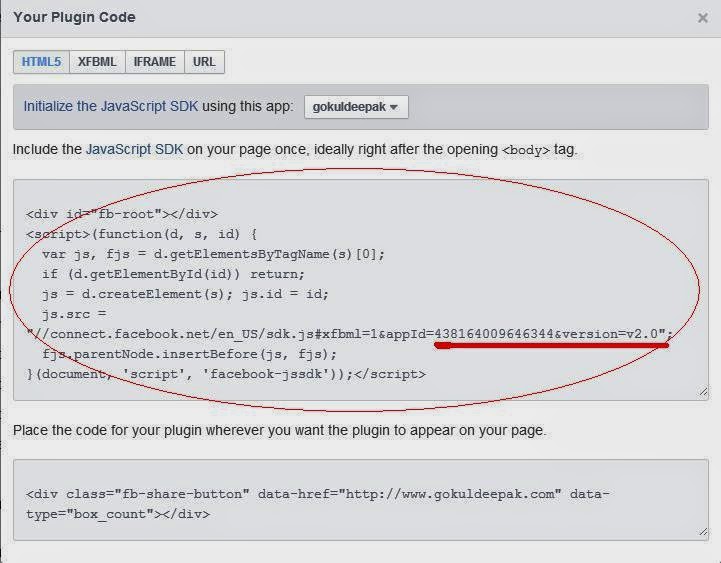
Paste the text which was highlighted by me in the blogger by following this method.
.
Using this code also gives me tips about hot to add a like button without using a URL and so the URL of current page will be automatically detected in the box. (I was searching for this but haven’t found at any websites/ Blogs)